
Showing posts with label Winter. Show all posts
Showing posts with label Winter. Show all posts
Tuesday, March 19, 2013
March/April Newsletter
The latest FNA news is online! Find the schedule of events for Arbor Day and Earth Week. Read about nesting facilities for local breeding birds and discover opportunities for butterfly monitoring training. Happy spring!
Wednesday, January 30, 2013
FNA General Membership Meeting

Hear about 2012 accomplishments and our plans for 2013 at Fermilab Natural Area’s Annual General Membership Meeting on February 7, 2013, at 7 p.m. in Fermilab’s Wilson Hall One West Conference Room.
Thursday, January 17, 2013
January / February Newsletter
The latest edition of the FNA newsletter is now available. Read about the February general membership meeting, the Fermilab Christmas Bird Count, reports from our high-school only fall prairie harvest, and stewardship at Big Woods South.
 The annual general membership meeting is scheduled for February 7 at 7:00 p.m. in Fermilab's One West conference room. Please join us!
Friday, December 21, 2012
Happy Holidays!

Happy Holidays to all or our friends, members, and volunteers at Fermilab Natural Areas! We are thankful for your commitments and contributions towards reaching our goals and look forward to the coming year.
Wednesday, December 5, 2012
Main Ring Prairie Burn
FNA member Gordon Koizumi captured this photo of the prescribed burn in Fermilab's Main Ring prairie yesterday.


FNA's November / December Newsletter
The latest edition of the FNA newsletter is now available. Read about the February general membership meeting, the fall prairie harvests, an award from the Volunteer Stewardship Network, Plants of Concern and Dragonflies.
In addition, there are many habitat workday opportunities throughout the winter, on Mondays, Thursdays, and Saturdays. Check the newsletter calendar, the FNA calendar, or the upcoming events on this page for a time that works for you!

In addition, there are many habitat workday opportunities throughout the winter, on Mondays, Thursdays, and Saturdays. Check the newsletter calendar, the FNA calendar, or the upcoming events on this page for a time that works for you!
Saturday, December 1, 2012
December Desktop Calendar
Enjoy scenes of Fermilab's natural areas on your computer desktop! Here are instructions for downloading & installing the December 2012 calendar pictured below onto your computer:

1. Click the image above to open in a new browser window (or tab).
2. Right-click (or ctrl-click for some Mac users) on the image, and chose the option that says, "Set Picture as", (or similar words; the exact wording will depend on your internet browser) and save to your desktop. On your desktop, right click “Properties” and select the “Desktop” tab. Click “Browse” and navigate to the saved image on your desktop. Select it & click “Open.” On the “Display Properties” dialogue box, click “OK.”
3. If the image does not fit your desktop background neatly, you may have to go to your preference screen (on a Mac: System Preferences > Desktop & Screen Saver > Desktop; or on Windows: Control Panel > Display > Desktop) and choose "Fit to screen" as the display mode of your background image.
Many thanks to our photo contributors for their efforts!

1. Click the image above to open in a new browser window (or tab).
2. Right-click (or ctrl-click for some Mac users) on the image, and chose the option that says, "Set Picture as", (or similar words; the exact wording will depend on your internet browser) and save to your desktop. On your desktop, right click “Properties” and select the “Desktop” tab. Click “Browse” and navigate to the saved image on your desktop. Select it & click “Open.” On the “Display Properties” dialogue box, click “OK.”
3. If the image does not fit your desktop background neatly, you may have to go to your preference screen (on a Mac: System Preferences > Desktop & Screen Saver > Desktop; or on Windows: Control Panel > Display > Desktop) and choose "Fit to screen" as the display mode of your background image.
Many thanks to our photo contributors for their efforts!
Thursday, November 1, 2012
November Desktop Calendar
Enjoy scenes of Fermilab's natural areas on your computer desktop! Here are instructions for downloading & installing the November 2012 calendar pictured below onto your computer:

1. Click the image above to open in a new browser window (or tab).
2. Right-click (or ctrl-click for some Mac users) on the image, and chose the option that says, "Set Picture as", (or similar words; the exact wording will depend on your internet browser) and save to your desktop. On your desktop, right click “Properties” and select the “Desktop” tab. Click “Browse” and navigate to the saved image on your desktop. Select it & click “Open.” On the “Display Properties” dialogue box, click “OK.”
3. If the image does not fit your desktop background neatly, you may have to go to your preference screen (on a Mac: System Preferences > Desktop & Screen Saver > Desktop; or on Windows: Control Panel > Display > Desktop) and choose "Fit to screen" as the display mode of your background image.
Many thanks to our photo contributors for their efforts!

1. Click the image above to open in a new browser window (or tab).
2. Right-click (or ctrl-click for some Mac users) on the image, and chose the option that says, "Set Picture as", (or similar words; the exact wording will depend on your internet browser) and save to your desktop. On your desktop, right click “Properties” and select the “Desktop” tab. Click “Browse” and navigate to the saved image on your desktop. Select it & click “Open.” On the “Display Properties” dialogue box, click “OK.”
3. If the image does not fit your desktop background neatly, you may have to go to your preference screen (on a Mac: System Preferences > Desktop & Screen Saver > Desktop; or on Windows: Control Panel > Display > Desktop) and choose "Fit to screen" as the display mode of your background image.
Many thanks to our photo contributors for their efforts!
Thursday, February 23, 2012
Invasives Workday, Monday 2/27
Please join us Monday, February 27th, from 1-3 PM for an afternoon cutting invasive brush. We will be working in a neat area on the north side of Morgan's Woods. Wood ducks, rare orchids, and the county's last bobcat are all part of this small, but rich woodland and its history!
Training, tools, ecology tips, and safety gear will be provided. Meet us on the west side of Fermilab in the parking lot of the Lederman Science Center. Dress for the weather. Children under 18 must be accompanied by an adult.
Last week we worked in Big Woods South and had 4 great volunteers cut honeysuckle! Thank you to Marlene, Rob, Bob, and Denis.
Training, tools, ecology tips, and safety gear will be provided. Meet us on the west side of Fermilab in the parking lot of the Lederman Science Center. Dress for the weather. Children under 18 must be accompanied by an adult.
Last week we worked in Big Woods South and had 4 great volunteers cut honeysuckle! Thank you to Marlene, Rob, Bob, and Denis.
Wednesday, February 1, 2012
February Desktop Calendar
Enjoy scenes of Fermilab's natural areas on your computer desktop! Here are instructions for downloading & installing the February 2012 calendar pictured below onto your computer:

1. Click the image above to open in a new browser window (or tab).
2. Right-click (or ctrl-click for some Mac users) on the image, and chose the option that says, "Set Picture as", (or similar words; the exact wording will depend on your internet browser) and save to your desktop. On your desktop, right click “Properties” and select the “Desktop” tab. Click “Browse” and navigate to the saved image on your desktop. Select it & click “Open.” On the “Display Properties” dialogue box, click “OK.”
3. If the image does not fit your desktop background neatly, you may have to go to your preference screen (on a Mac: System Preferences > Desktop & Screen Saver > Desktop; or on Windows: Control Panel > Display > Desktop) and choose "Fit to screen" as the display mode of your background image.
Many thanks to our photo contributors for their efforts!

1. Click the image above to open in a new browser window (or tab).
2. Right-click (or ctrl-click for some Mac users) on the image, and chose the option that says, "Set Picture as", (or similar words; the exact wording will depend on your internet browser) and save to your desktop. On your desktop, right click “Properties” and select the “Desktop” tab. Click “Browse” and navigate to the saved image on your desktop. Select it & click “Open.” On the “Display Properties” dialogue box, click “OK.”
3. If the image does not fit your desktop background neatly, you may have to go to your preference screen (on a Mac: System Preferences > Desktop & Screen Saver > Desktop; or on Windows: Control Panel > Display > Desktop) and choose "Fit to screen" as the display mode of your background image.
Many thanks to our photo contributors for their efforts!
Friday, January 27, 2012
Osprey Nest available at Nepese Marsh
from Fermilab Today, January 26, 2012:

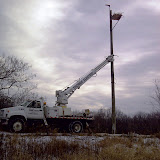
Fermi Natural Areas and Thorne Electric of Carol Stream situated a bird nesting platform at Nepese Marsh on the eastern side of the Fermilab site. Volunteering their services, FNA and Thorne Electric personnel hope that the structure will attract a pair of large birds of prey to nest.
Data suggest that osprey fledglings tend to stay within a couple miles of where they were born. Presently, there is a nesting pair of osprey on the western side of Fermilab's site. They have produced young, one of which may be the future tenant of the Nepese Marsh platform.
There are also bald eagles nesting on Randall Road in Batavia, which is a short flight. Perhaps, if the nesting platform does not interest an osprey, an eagle will take up residence in the coming months.
The platform was a joint effort by laboratory employees volunteering their time to complete various stages of the project, and Tom Eggleston, of the Housing Office, built the nest structure from scrap wood. Hopefully, a feathered friend will move in by spring.
—Dave Shemanske, FESS

Data suggest that osprey fledglings tend to stay within a couple miles of where they were born. Presently, there is a nesting pair of osprey on the western side of Fermilab's site. They have produced young, one of which may be the future tenant of the Nepese Marsh platform.
There are also bald eagles nesting on Randall Road in Batavia, which is a short flight. Perhaps, if the nesting platform does not interest an osprey, an eagle will take up residence in the coming months.
The platform was a joint effort by laboratory employees volunteering their time to complete various stages of the project, and Tom Eggleston, of the Housing Office, built the nest structure from scrap wood. Hopefully, a feathered friend will move in by spring.
—Dave Shemanske, FESS
See more photos of the nest installation online:
Friday, January 13, 2012
January / February FNA Newsletter available
The latest news from Fermilab Natural Areas highlights the receipt of a grant from the DuPage Community Foundation, a tool donation from Corona Tools, and an Eagle Scout project to repair footbridges in the Big Woods.
Thanks to all of you for your support in 2011 and we look forward to many good things in 2012! As always, a high-resolution of the newsletter is available online.
 |
Tuesday, January 10, 2012
January Desktop Calendar
Enjoy scenes of Fermilab's natural areas on your computer desktop! Here are instructions for downloading & installing the January 2012 calendar pictured below onto your computer:

1. Click the image above to open in a new browser window (or tab).
2. Right-click (or ctrl-click for some Mac users) on the image, and chose the option that says, "Set Picture as", (or similar words; the exact wording will depend on your internet browser) and save to your desktop. On your desktop, right click “Properties” and select the “Desktop” tab. Click “Browse” and navigate to the saved image on your desktop. Select it & click “Open.” On the “Display Properties” dialogue box, click “OK.”
3. If the image does not fit your desktop background neatly, you may have to go to your preference screen (on a Mac: System Preferences > Desktop & Screen Saver > Desktop; or on Windows: Control Panel > Display > Desktop) and choose "Fit to screen" as the display mode of your background image.

1. Click the image above to open in a new browser window (or tab).
2. Right-click (or ctrl-click for some Mac users) on the image, and chose the option that says, "Set Picture as", (or similar words; the exact wording will depend on your internet browser) and save to your desktop. On your desktop, right click “Properties” and select the “Desktop” tab. Click “Browse” and navigate to the saved image on your desktop. Select it & click “Open.” On the “Display Properties” dialogue box, click “OK.”
3. If the image does not fit your desktop background neatly, you may have to go to your preference screen (on a Mac: System Preferences > Desktop & Screen Saver > Desktop; or on Windows: Control Panel > Display > Desktop) and choose "Fit to screen" as the display mode of your background image.
Thursday, December 29, 2011
Happy Holidays & Thank You!

Many thanks to everyone for your support all year long! From those who've provided financially to those who've come out to lend a helping hand to the natural areas - THANK YOU!
Best wishes for a wonderful 2012!

Many thanks also to Gordon Koizumi for providing beautiful photographs all year long, including these two beauties. Gordon writes:
I hope you have been able to get out and go for a walk. Today was a cold day but there are still very interesting things to observe. I thought I would include something a bit different from my usual photos as well. The second photo was taken with my point and shoot at the pond near the Science Education Center. What you are looking at are just some bubbles trapped in the clear ice that has formed over the pond. I thought they were interesting so I took some amateur photos of them. Although you can't see it in this photo, these bubbles look like they were left above a route taken underwater by some fairly large animal such as a muskrat or a fisher. You can see a clear "trail" where there's no underwater vegitation that leads from one bank toward the other. I have seen some weasel like creature near by very briefly not too long ago but not well enough to be able to identify it with any certainty. I've been told that a fisher has been observed. Has anyone seen him/her?
Monday, February 28, 2011
Event Recap: 4th Annual General Membership Meeting


Following the formal meeting, the assembled members and friends lingered over cookies coffee, catching up on off-season activities and sharing ideas for the future of Fermilab Natural Areas.

Thanks to all who came out for the annual meeting and a special thanks to Pam Becker for the yummy refreshments.
Friday, February 25, 2011
Fermilab Family Open House

Tuesday, January 18, 2011
January/February Newsletter

Wednesday, December 29, 2010

Subscribe to:
Posts (Atom)


 Posts
Posts

